

What Changes When You Switch On WordPress AI?
While researching hosting ownership, server locations and infrastructure for HostScout.ca, I keep coming back to a basic problem: business owners often know which country their website is hosted in but have much less visibility into the services their website communicates with.
WordPress 7.0 makes that distinction more important. A site can run on a Canadian server, keep its customer database in Canada, and still send a selected piece of content to an AI provider when a plugin makes a request. That request could contain nothing sensitive. It could also contain a support ticket, a product order, a draft with customer details or a photograph of an identifiable person.
WordPress 7.0 does not send content to an AI provider by default. The built-in AI Client is infrastructure. Once a provider is configured and a feature invokes it, information included in that request can leave the WordPress environment. Canadian privacy obligations then depend on the information, the purpose, the provider and the actual processing locations, not merely on whether the connector is enabled.
I would treat this as a data-flow review, not an argument for avoiding AI. For many websites, generating alt text from an approved public image may be workable. Sending unredacted customer correspondence to an unspecified model is a different decision entirely.
What WordPress 7.0 Actually Ships
WordPress 7.0, codenamed Armstrong, was released on May 20, 2026. The key change is a consistent way for plugins and themes to communicate with AI models without each one reinventing its own model integration. The official WordPress 7.0 release announcement describes the AI Client and its integration with the Abilities API.
Here is how I separate the parts. They do related jobs, but they are not interchangeable.
| Component | What it does | Privacy question |
|---|---|---|
| WP AI Client | Provides a consistent PHP interface for requesting text, image and other model-generated results through configured providers. | What text, media or metadata is assembled into the prompt? |
| Connectors API and Settings screen | Registers external connections and manages credentials for providers such as OpenAI, Anthropic and Google. | Which providers are enabled and how are their credentials protected? |
| Provider plugin | Implements the actual service connection and translates WordPress requests for a specific provider. | Which API endpoint, account terms and processing arrangements apply? |
| Abilities API | Lets software register discoverable actions with defined inputs and permission handling. | Can the AI-enabled feature reach orders, users, unpublished posts or other privileged data? |
| AI-enabled feature | A plugin or custom workflow actually triggers a model request for a particular task. | When does the request run, and who authorized that use? |
The three featured connections in Settings are OpenAI, Anthropic and Google. Those are connector entries, not three pre-authorized AI services running in the background. WordPress Core does not bundle the provider implementations or working API credentials. An installed provider plugin and a configured key, followed by a feature making a call, are what turn the infrastructure into an operational AI workflow.
There is also no universal automatic approval layer that decides whether a prompt is suitable for a third party. The website owner and the developer of the feature still need to make those decisions.
Is the Abilities API the same as an MCP server?
No. The Abilities API provides a way to define and permission WordPress actions. Model Context Protocol (MCP) is a separate protocol for exposing tools and resources to compatible AI clients. WordPress has an optional MCP Adapter that bridges selected abilities to MCP, but merely installing WordPress 7.0 does not expose your entire site as a public MCP server. Even with an adapter, administrators need to review which abilities are exposed and how authentication is enforced.
A local MCP bridge may help with authentication and workflow control, but it is not automatically a Canadian data-residency solution. If a bridge sends a prompt to a cloud model, that external request still needs its own review.
A Canadian Data Point Most WordPress AI Guides Leave Out
The Office of the Privacy Commissioner of Canada published a 2025–2026 survey of Canadian businesses covering 800 organizations in consumer-facing sectors that handle personal information. It gives useful context for how quickly AI is moving into ordinary business operations.
Source: Office of the Privacy Commissioner of Canada, 2025–2026 business survey. Bar lengths use a 20% visual scale. These figures describe the surveyed Canadian businesses, not WordPress websites or the number of firms using WordPress 7.0.
One detail caught my attention: only 2% of surveyed businesses said they used customer information to train an AI system. That is not the same question as whether a business sends information to a model for inference, document drafting or support. Those are different kinds of processing. A privacy audit needs to distinguish them rather than assuming all AI use means training a model on customer records.
What Actually Leaves a Canadian WordPress Website?
The cleanest way to understand the risk is to follow one request. Imagine a Canadian retailer uses a plugin to draft a reply to a customer message. The WordPress database could remain in Montréal, while the plugin selects the customer's message, adds an instruction and submits those details to an AI service.
WordPress's AI Client is not, by itself, evidence of a full-database export. The individual AI feature determines which data is passed into a prompt. The provider's actual infrastructure, logs, retention period and possible access by subcontractors determine what happens next. A response may then be displayed in the editor or saved back into WordPress, creating another record that has to be governed.
Where is WordPress hosted? tells you where the site runs. Where is an AI request processed? tells you where selected content may be handled after a model is called. Those locations are not guaranteed to match, even if the organization uses Canadian-owned hosting.
It's equally important not to assume every call goes to the United States. A US-headquartered provider, a particular API product, a regional deployment and a self-hosted model can have different processing arrangements. I would ask for the selected service's actual processing locations rather than infer them from a vendor's headquarters.
The Settings → Connectors Screen: What Site Owners Should Check
WordPress 7.0 groups external service connections under Settings → Connectors. That is helpful, especially on sites where several plugins once stored keys on separate settings pages. But a centralized screen is an inventory of connections, not a complete audit of the code that can use them.
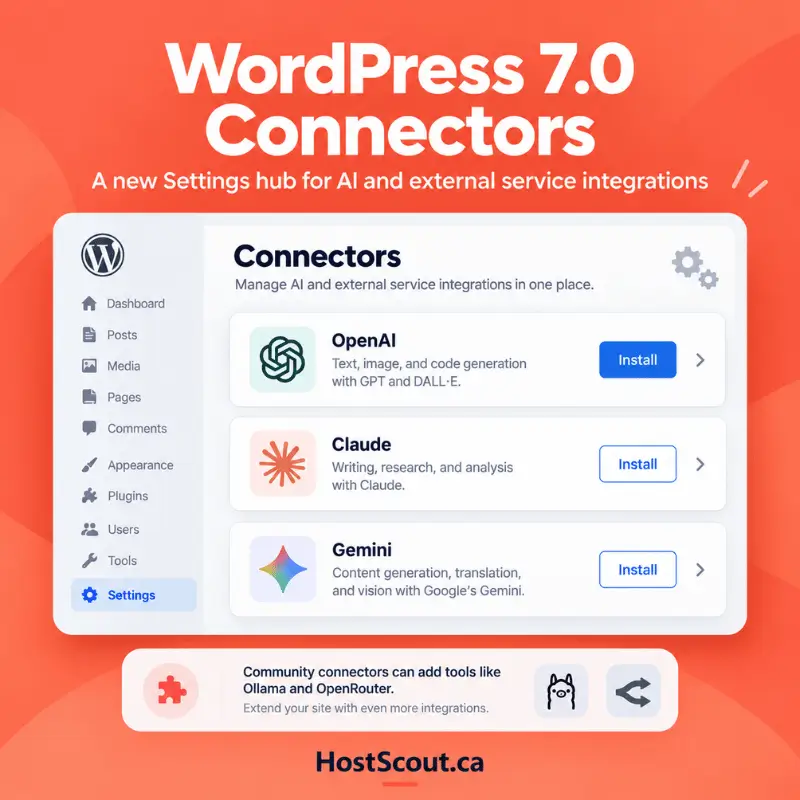
I would record the active provider, the account owner, the API product being used and which plugin actually makes each request. The three featured providers are starting points, not a closed list. Community integrations can support other services, including Ollama and OpenRouter. A local Ollama model can be an option for reducing external data transfers if it truly runs on infrastructure you control; an Ollama service running on someone else's server is still a separate processing location.
One more distinction matters: a ChatGPT consumer account and an OpenAI API integration are not automatically subject to identical product settings, retention terms or business controls. The same caution applies when comparing other vendors' consumer chatbots with their developer APIs.
The API-Key Detail That Deserves More Attention
For me, the most interesting technical finding is in the official WordPress Connectors developer note. For connectors using API-key authentication, credentials are checked in this order:
Environment variable such as OPENAI_API_KEY, set securely in the server environment.
PHP constant supplied through controlled server configuration.
WordPress database setting, for example a connector's API-key option.
According to that developer note, keys stored by this feature in the database are masked in the interface but not encrypted in the database. That is different from saying the keys are publicly visible: the database and its backups should still be protected. It does mean an attacker or unauthorized person with access to the stored option value could potentially recover the credential.
If I were configuring a production site, I would prefer a properly managed server environment or secrets system, limit access to the hosting account and backups, and rotate keys when staff or vendors change. Moving a key out of the database is useful, but it does not stop malicious PHP code running inside the same application from potentially accessing a credential.
Also review API spending limits, provider account permissions and logging. A compromised key can create a billing and abuse problem even where the AI prompt itself contains no personal information.
Where PIPEDA, Quebec Law 25 and Bill C-36 Fit In
There is no special nationwide rule saying that using WordPress 7.0's AI Client is legal or illegal. The starting point is the privacy law that applies to the particular organization and information. For Canadian private-sector sites that may mean PIPEDA, a substantially similar provincial private-sector privacy law, or a combination depending on the activity.
| Framework | What matters for WordPress AI | Practical question |
|---|---|---|
| PIPEDA | Accountability, valid and meaningful consent where required, limiting use, safeguards and comparable protection when a third party processes information on the organization's behalf. | Does our existing authority cover sending this information to this provider for this purpose? |
| Quebec Law 25 | Relevant EFVP duties for certain information-system projects, plus a section 17 assessment and written agreement before covered personal information is communicated or entrusted outside Québec. | Will the AI provider or its processors handle personal information outside Quebec? |
| British Columbia and Alberta PIPA | Their own private-sector privacy requirements can govern personal information handling and service-provider arrangements. | Which provincial and federal rules apply to our organization and customers? |
| Bill C-36 | Proposed federal privacy modernization, including the Protecting Privacy and Consumer Data Act. Not enacted as of October 20, 2026. | Which existing obligations apply today, and which proposed changes need monitoring? |
PIPEDA is about accountability, not just where a server sits
The Office of the Privacy Commissioner's September 2026 guidance on assessing third-party service providers is directly relevant. It asks organizations to identify the personal information being handled, map data flows, understand whether providers use data for their own purposes, and ensure appropriate contractual and security protections. At the time of writing, the guidance is open for consultation until December 4, 2026.
That means a Canadian agency using AI to summarize a client's customer-service inbox should look at what information is included, whether it is necessary, which subcontractors handle it and how long records persist. I would not treat a generic privacy-policy sentence saying “we use AI” as an adequate substitute for reviewing those questions.
Quebec can require an additional assessment
The Commission d’accès à l’information explains that Quebec’s private-sector privacy framework can require an EFVP, or privacy impact assessment, before communicating or entrusting personal information outside the province. The boundary is outside Québec, not simply outside Canada. A Quebec company using a model hosted in Ontario may therefore need to review a different set of flows than a company looking only at international transfers. For a fuller explanation, see HostScout's Quebec Law 25 cloud hosting guide.
Do not treat Bill C-36 as law already in force
Canada introduced Bill C-36 in June 2026. The proposed Protecting Privacy and Consumer Data Act is significant, but Parliament's record shows the bill at second reading as of this article's publication date. It should be monitored, not cited as an enacted requirement that WordPress operators already have to obey.
Businesses with EU-facing AI features may also need to assess GDPR separately. I covered the territorial scope, cookies and hosting questions in Does GDPR Apply to Canadian Websites?
Which WordPress AI Tasks Create the Most Privacy Exposure?
Instead of ranking AI providers by brand, I would start with the material being sent. This is my own illustrative risk triage for a typical Canadian business website, not measured incident data or a regulator's classification. A low-data task can become sensitive if a plugin adds hidden context or a connected record.
| WordPress AI use | Information that might leave the site | Initial review priority |
|---|---|---|
| Headline or excerpt suggestions | Public article copy selected by an editor | Lower Confirm drafts do not contain confidential details |
| Alt text for public images | Image pixels, embedded text, image metadata | Review Check whether people or private details appear |
| Unpublished staff documents | Plans, supplier pricing, employee names and files | Review Restrict and minimize source material |
| WooCommerce order summaries | Names, addresses, purchase history and account identifiers | Higher Assess purpose, authority and provider terms |
| Support chat or contact forms | Messages, contact details, sensitive information entered by visitors | Higher Review notices, consent and retention |
| AI agents allowed to run actions | User and system records reachable through plugin capabilities | Higher Enforce permissions, least privilege and auditability |
The key difference is not that one WordPress button says “AI” and another does not. It is whether information about identifiable people, confidential work or privileged actions becomes available to the model or the code around it.
A Privacy-First Plan Before Enabling WordPress AI
I would run through these six checks on a staging site before allowing an AI feature to touch production data.
Inventory the actual AI features
List the plugins and workflows that can call a provider, not just the entries visible under Connectors. Note whether a feature runs when an editor clicks a button, on a schedule or in response to a visitor.
Capture one representative request
Use test records and a controlled logging method to identify the fields placed into a prompt. Watch for customer names in post metadata, image text, order IDs, support tickets and debug logs. Never log live secrets just to conduct the audit.
Check the provider's specific API terms
Confirm processing jurisdictions, retention, service improvement or model-training practices, subcontractors, deletion options and security commitments for the actual API product, rather than for a consumer chatbot with a similar name.
Reduce the data sent
Generate copy from approved public content where possible. Remove personal identifiers from sample records and prevent high-risk fields from entering prompts. Avoid relying on a prompt telling the model to ignore confidential data if the confidential data was already supplied.
Restrict permissions and credentials
Decide which roles may use each AI feature and verify the plugin enforces those restrictions server-side. Prefer managed secrets where practical, protect database backups, rotate keys and apply provider spending limits.
Document the approval and retest
Record the approved use, provider, data categories, location, retention and legal basis. Revisit the assessment when a plugin update adds new abilities, a provider changes terms or the business begins using AI with more sensitive information.
One developer control worth knowing
The WordPress AI Client developer notes document a wp_ai_client_prevent_prompt filter. A developer can use it to stop requests under defined conditions. For example, the following pattern prevents non-administrators from sending prompts through the Core AI Client:
add_filter(
    'wp_ai_client_prevent_prompt',
    function ( bool $prevent, WP_AI_Client_Prompt_Builder $builder ): bool {
        if ( ! current_user_can( 'manage_options' ) ) {
            return true;
        }
        return $prevent;
    },
    10,
    2
);
This is a developer example, not a complete security policy. Place reviewed code in a properly maintained plugin or mu-plugin, not in an untested live theme. It does not block third-party plugins that bypass the WordPress Core AI Client and call external APIs directly. Use per-feature capability checks and server-side validation as well.
Does Canadian-Owned WordPress Hosting Change the Privacy Calculation?
Canadian hosting is useful, especially when a business wants to document where its primary website, database and backups are operated. But the origin of an AI request and the destination of that request are separate pieces of infrastructure. A WordPress server in Toronto does not make an external AI endpoint a Toronto service.
If I were choosing among Canadian-owned web hosting companies, I would assess the hosting provider's corporate control and server locations, then do a separate review of AI integrations. The same approach appears in our guide to data residency versus data sovereignty: geographic location and operational or legal control are not identical. If you are still comparing platforms for a WordPress project, I also put together a separate guide to Canadian WordPress hosting that focuses more on the hosting side than the AI side.
You can use HostScout's Is It Hosted in Canada? tool to investigate the public-facing website's network location. That is a useful first layer of evidence, but it does not reveal the contents of AI API requests, background plugin calls, all backup locations or a provider's legal processing arrangements.

WHC Managed WordPress
A straightforward option for Canadian businesses that want WordPress hosting with bilingual support, familiar onboarding and local infrastructure choices.
Visit WHC
FullHost WordPress Hosting
A practical fit if you want a Canadian-managed WordPress environment with a simpler product lineup and a bit more of a boutique-provider feel.
Visit FullHostThese recommendation links are affiliate links and are marked with rel="nofollow sponsored".
“Show me one actual AI request, including the plugin that created it, which fields it contained, which provider received it, and what prevents the feature from sending more personal information than it needs.” That is more useful than a yes-or-no answer to “Is this AI PIPEDA compliant?”
Frequently Asked Questions
Does WordPress 7.0 automatically send website content to ChatGPT or another AI provider?
No. WordPress 7.0 includes an AI Client, but it does not install a working provider connection or send prompts simply because you update WordPress. An AI-capable plugin or other calling code must use a configured provider. Review each feature after you configure a connector.
Does the WordPress AI Client comply with PIPEDA?
There is no automatic compliance certification. PIPEDA obligations depend on the organization, the personal information involved, its purposes, safeguards and any third-party processing. The WordPress AI Client is infrastructure; the specific plugin, provider and data flow determine what needs to be assessed.
Where does WordPress 7.0 store AI API keys?
The Connectors API can read a provider key from an environment variable, a PHP constant or a WordPress database setting, in that order. WordPress documentation states that keys stored in the database are masked in the admin interface but not encrypted at rest by the Connectors feature.
Does Canadian WordPress hosting keep AI prompts and customer data in Canada?
Not by itself. Canadian hosting tells you where the WordPress service or database is located. An enabled AI plugin can send selected content to a separate model endpoint. Processing locations, retention, subcontractors and support access depend on the chosen provider and contractual configuration.
Does Quebec Law 25 require a privacy assessment before using WordPress AI?
It can. Quebec private-sector organizations must assess certain information-system projects involving personal information, and section 17 imposes an EFVP before communicating or entrusting personal information outside Quebec. Whether a particular WordPress AI workflow triggers these rules depends on its design and data flows.
Is Bill C-36 already the privacy law governing WordPress AI in Canada?
No. As of October 20, 2026, Bill C-36, which proposes the Protecting Privacy and Consumer Data Act, remains proposed federal legislation at second reading. Existing applicable privacy statutes, including PIPEDA and provincial privacy laws, remain the starting point.
The Takeaway for Canadian Site Owners
I see WordPress 7.0 as an improvement in how developers connect models, not as a new privacy exemption or an automatic data-transfer problem. The architecture gives developers a common foundation. The decisions that matter most still sit with the site owner: what the plugin can reach, what gets sent, who receives it and what the business has promised its customers.
Keep those decisions documented, start with low-sensitivity use cases, and make AI features earn access to customer information instead of assuming that a connector makes every use appropriate.
Research reviewed October 20, 2026. This article provides general technical and privacy information, not legal advice or a certification of any provider, plugin or website.