

The short answer: Should a .CA owner enable DNSSEC?
For a business-critical .ca domain, I recommend DNSSEC when the registrar and DNS provider support it properly. For a one-page portfolio, it is an optional improvement rather than a requirement. It does not replace HTTPS, and it will not fix an insecure server, but it does give validating DNS resolvers a way to reject forged DNS answers.
There is an important catch. A registered .ca name is not automatically DNSSEC-protected merely because CIRA signs the .ca zone. Your own domain must be signed, and the parent .ca zone must contain a matching Delegation Signer (DS) record. That last step is where registrar support becomes relevant.
If your domain handles customer logins, business email, online orders or sensitive relationships, I would put DNSSEC on the security checklist, but I would rather leave it off temporarily than publish an unverified DS record that breaks the domain.
Four useful facts about Canada's .CA domain
Canada's .ca domain has been around since 1987. A few figures help put its size and DNSSEC support into context.
Reported at the close of CIRA's FY2026, rather than an unrepeatable live counter.
The Canadian top-level domain was originally administered by volunteers at the University of British Columbia.
CIRA became the registry operator after the volunteer-managed era.
On January 21, CIRA published a signed .ca zone and submitted its DS to IANA.
The domain total comes from CIRA's FY2026 annual report. Its registry timeline and January 2013 DNSSEC update document the other milestones. The 3.5 million figure covers all registered .ca names, not just domains with DNSSEC enabled.
What DNSSEC actually protects and what it doesn't
Think about a customer opening yourbusiness.ca. Their device asks a recursive DNS resolver which address or mail server belongs to that domain. Classic DNS was designed to provide answers, but not to authenticate them cryptographically. DNSSEC adds signed records so a validating resolver can check the origin and integrity of the answer it receives.
That helps defend against certain forged-response and cache-poisoning attacks. It does not encrypt the DNS question, encrypt the website connection, confirm that a company is legitimate or prevent an attacker who has taken control of the DNS provider itself from publishing malicious records with valid signatures.
| Technology | Main job | What it does not guarantee |
|---|---|---|
| DNSSEC | Authenticates DNS records and signed non-existence responses | No confidentiality; no protection from a compromised legitimate signer |
| HTTPS / TLS | Authenticates the website endpoint and protects the browser connection | Does not by itself ensure DNS answers are authentic |
| DoH / DoT | Encrypts DNS traffic between a device and a DNS resolver | Does not replace DNSSEC's authoritative signature chain |
| Registrar lock + MFA | Makes account compromise and unauthorized changes harder | Cannot cryptographically authenticate a resolver's answer |
These controls protect different parts of the connection. Registrar security protects the account, DNSSEC protects the integrity of signed DNS answers, encrypted DNS protects the path to the resolver, and HTTPS protects the website connection. None replaces the others.
How the DNSSEC chain of trust works for .CA
DNSSEC verification begins with a trusted root key. The root zone contains a DS record for .ca; CIRA signs the .ca zone; then .ca can publish the DS record for an individual domain. The domain's authoritative DNS service signs its own data and publishes its DNSKEY records. A validating resolver checks that the signatures and hashes lead back to the trusted root.
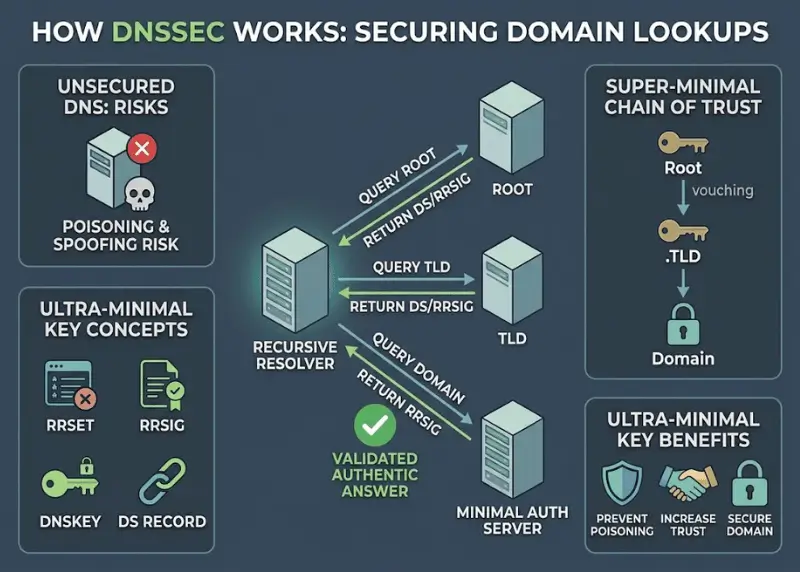
.ca; your DNS provider signs your own domain; a validating resolver checks the resulting chain.This is not the same as your browser asking CIRA directly for every page view. Most users reach DNS through a recursive resolver operated by their ISP, employer or chosen DNS service. It is the validating resolver that checks the DNSSEC chain when resolving a signed domain.
Root zoneTrust anchor and DS for .ca
CIRA .CA zoneSigned DNS data and DS for your domain
Your authoritative DNSDNSKEY and signatures for A, MX, TXT and other records
Validating resolverChecks the signatures before accepting the answer
The technical part: DS, DNSKEY and RRSIG
Three record types do much of the work. A DNSKEY publishes a public DNSSEC key for the zone. An RRSIG is a digital signature over a set of DNS records. A DS record lives in the parent zone and identifies the child zone's key through a hash and some metadata.
| DS field | Example / meaning | Why it matters |
|---|---|---|
| Key tag | Numeric identifier for a DNSKEY | Helps the validator identify the matching key |
| Algorithm | For example, 13 represents ECDSAP256SHA256 | Declares the public-key signature algorithm |
| Digest type | For example, 2 identifies SHA-256 | Tells a validator how the key fingerprint was made |
| Digest | Long hexadecimal hash value supplied by the DNS host | Must correspond to the key currently served by your signed zone |
Some platforms also display Key Signing Keys (KSKs) and Zone Signing Keys (ZSKs). In a common model, the KSK helps authenticate the DNSKEY set and the ZSK signs the ordinary records. Providers can manage these keys differently, and most small businesses should not need to handle raw private keys.
Signed zones can also authenticate an answer that a name does not exist, using denial-of-existence mechanisms such as NSEC or NSEC3. This matters because an attacker otherwise might forge an “it does not exist” response just as easily as an incorrect IP address.
Why a valid DS record can still break your domain
Here's a detail that's easy to overlook. Section 3.4 of CIRA's DNSSEC Practice Statement for .CA says the registry accepts properly formatted DS records without confirming that the key matches the one actually used by the domain's DNS provider.
That distinction is easy to miss. CIRA can accept a DS record that is structurally valid but operationally wrong. The parent zone can then announce that your domain is secured even though the signed records served by your DNS provider no longer match that announcement. A validating resolver treats that as a failure, not as permission to ignore the signatures.
A registrar's “DNSSEC enabled” toggle is not proof of a healthy chain of trust. Check the DS at the parent, the DNSKEY at your authoritative provider and the result from a validating resolver. This is especially important after moving nameservers or rolling keys.
CIRA's practice statement also separates responsibilities: the DNS operator signs your zone, the registrar submits DS changes and the registrant supplies accurate information. That makes the choice of registrar interface more important than its marketing page.
Which Canadian websites should prioritize DNSSEC?
I'd give higher priority to domains used for orders, customer accounts and professional email. A personal portfolio is less urgent. These are practical priorities based on the impact of a DNS failure or forged answer, not industry requirements set by CIRA.
| Site or domain use | Priority | Reason |
|---|---|---|
| Online store, booking or account portal | High | Customers depend on correct DNS routes for web and related services |
| Law firm, accounting practice or clinic | High | Trust-sensitive email and online communications |
| Business using its domain for professional email | High | DNS affects MX and TXT records as well as website IP addresses |
| Local service-business brochure site | Useful | Good hardening if the provider makes activation and rollover straightforward |
| Personal portfolio with no mail or logins | Lower | Small attack surface; avoid manual complexity that cannot be maintained |
DNSSEC is only one layer. I would also enable multifactor authentication for the domain account, use registrar locking when available, protect account-recovery contacts and monitor changes. If someone compromises the legitimate DNS signing account, they may be able to publish malicious records with valid signatures.
Email is part of this decision too. DNSSEC can authenticate signed MX and TXT lookups when the receiving resolver validates DNSSEC. It does not authenticate who sent a message or guarantee encrypted delivery. A Canadian business using Microsoft 365, Google Workspace or another mail provider should still configure SPF, DKIM and DMARC as separate email controls.
Before buying: check both the registrar and the DNS host
You can buy a .ca name from a registrar and host its DNS somewhere else. That is normal, but it means DNSSEC may involve two dashboards. The registrar needs a DS-management path for .ca; the authoritative DNS provider needs to sign the zone and handle future key changes.
| Question to ask | What to look for | Why it matters |
|---|---|---|
| Can you manage DS records for .CA? | Self-service fields or documented support process | Without this, the parent delegation cannot complete the chain |
| Which algorithms and digest types? | Support for the values produced by the DNS provider | A registrar and DNS host must be compatible |
| Who handles key rollover? | Automatic management or an explicit procedure | Stale keys or DS records can cause failures later |
| What happens if I change nameservers? | A documented hand-off with rollback steps | A DS tied to the old signer can break the new delegation |
For example, FullHost advertises DNSSEC on its .ca domain page. Other providers may support DNSSEC only through certain DNS products or support requests. Before buying, ask whether you can publish a DS record for your actual .ca domain, including when the nameservers are hosted elsewhere.
How I'd enable DNSSEC on a production .CA domain
I would start with inventory, not with the switch. Know your active nameservers, current DNS provider, registrar account owner, normal A/AAAA/MX/TXT records and the people who can reverse a change. For a domain tied to orders or business email, schedule the work when somebody can monitor DNS resolution.
Identify the actual authoritative nameservers
Record your current NS delegation and confirm which service owns the signed zone. A web host and a domain registrar do not necessarily run the same DNS.
Enable signing at the DNS provider
Use the provider's managed DNSSEC flow where possible. Confirm the provider publishes DNSKEY and RRSIG records for the zone.
Record the DS values exactly
Copy the key tag, algorithm, digest type and digest supplied by the DNS provider. Don't try to invent a digest or copy a sample from a blog post.
Submit the DS at your registrar
Use the registrar's domain-level DNSSEC setting or ask support to publish it into the .ca parent. You do not normally add your own DS as an ordinary record in the child zone.
Validate from an independent resolver
Confirm the parent DS exists, signed DNSKEY/RRSIG data is present and validating queries succeed. Test the domain and any critical email-related names.
Document how to change or remove it safely
Keep the provider's rollover instructions and a responsible contact. Before any future DNS migration, review the DS chain again.
I would not activate DNSSEC and immediately transfer or replace nameservers as a separate, uncoordinated step. The current signing keys and the current parent DS must remain compatible during that transition.
How to check whether DNSSEC is working
There are a few basic checks I would run on a Mac, Linux machine or Windows system that has BIND's dig tool installed. Replace yourbusiness.ca with your own domain; these are commands to inspect public DNS, not a promise that a particular domain is signed.
dig yourbusiness.ca DS +shortAn empty result can mean no DS was published. That is different from a DS that exists but doesn't match the zone's key.
dig yourbusiness.ca DNSKEY +dnssec +noall +answerYou may see DNSKEY and RRSIG records in a signed zone. Their presence alone does not prove the complete parent-to-child chain validates.
dig @1.1.1.1 yourbusiness.ca A +dnssecA successful signed response may include the ad flag (authenticated data). SERVFAIL can indicate a broken chain, though other DNS faults can also cause it.
For deeper diagnostics, delv yourbusiness.ca A can perform DNSSEC validation directly where the tool is available. A DNSSEC visualizer can also make parent and child relationships easier to follow. The practical goal is to confirm a secure answer from validation, not merely to see a green “enabled” status in one dashboard.
No parent DS means a resolver cannot complete a secure chain to your domain. This is not the same as a broken signature.
A parent DS that cannot be matched to current child DNSKEY records may cause validating resolvers to return SERVFAIL.
The signed records and parent chain validate. A trusted validating resolver may mark the response with the AD flag.
These are simplified diagnostics, not guaranteed outcomes for every resolver or query. Test with an independent validating resolver and inspect the authoritative records.
| Observed result | What it might mean | What I would check next |
|---|---|---|
| NOERROR with AD | The trusted recursive resolver reports an authenticated response | Confirm expected records and keep monitoring after changes |
| NOERROR without AD | The answer may be insecure, or the query path may not show validation status | Check DS/DNSKEY and test with a validating resolver |
| SERVFAIL | DNSSEC validation failure is one possibility among several | Compare parent DS, child DNSKEY, signatures and authoritative availability |
| DS present but no signed zone | Possible broken delegation | Follow the provider's rollback or signing instructions promptly |
The AD flag is only as trustworthy as the resolver and connection you are querying; don't treat it as an independent website-security certificate. It's one piece of technical evidence in a larger check.
The biggest operational risk: changing DNS providers
Imagine your .ca domain is signed by DNS provider A. The parent .ca zone holds a DS record derived from provider A's key. You decide to move to provider B, which uses different keys, and change the nameservers without revisiting the DS. A validating resolver can now see a signed promise in the parent that provider B cannot satisfy. The result can be SERVFAIL for visitors who use validating resolvers.
This isn't theoretical. Cloudflare's DNSSEC migration guidance explicitly warns about old DS records when changing authoritative nameservers. There are advanced multi-signer methods for coordinated migrations, but I would not assume a small-business hosting plan supports them.
Typical low-complexity migration
Follow the old and new providers' procedure for removing the old DS, allow the relevant TTL to expire, change authoritative nameservers, then enable signing and add the new DS. Expect a window when the domain is not DNSSEC-protected.
Advanced coordinated migration
When both providers support multi-signer DNSSEC, signing and DS publication can be coordinated so validation continues through the handover. It requires specialist configuration and monitoring.
Cloudflare documents both approaches in its DNSSEC configuration and migration guidance. I would use the instructions for the exact providers involved rather than copying a timing example from another DNS service.
Key rollovers present a similar issue at a smaller scale: the old and new signatures must remain valid through the transition. A registrar with reliable automated DS handling can significantly reduce the amount of manual work.
Does DNSSEC slow a .CA website down?
Not in the way that a slow web host or heavy JavaScript slows page rendering. DNSSEC introduces signatures, additional DNS records and some cryptographic verification. An uncached lookup can involve extra DNS work, and the DNS response can be larger than an unsigned answer. But recursive resolvers cache those records and avoid performing the full chain walk for every page view.
I would be more concerned about a broken deployment, outdated resolver infrastructure or network paths that mishandle larger DNS responses than a universal speed penalty. A signed .ca domain doesn't automatically make pages faster, either. It is a security feature, not a CDN or page-cache replacement.
Measure uncached DNS lookup behaviour and real user page performance before and after if performance is a concern. Don't infer a measurable slowdown from the mere presence of DNSSEC. Prioritize the correctness of DNS validation and reliable fallback to TCP for larger DNS messages.
Compare four .CA domain registrars
The first-year price is only part of the picture. I would compare the renewal rate, DNS management, DS-record support and how easy it is to move the domain later. All four companies sell .ca domains. Webnames shows registration prices during a domain search, so I've left that figure as a live quote rather than guessing.
Some of these links may earn HostScout a commission if you make a purchase.

FullHost
Lists the same rate for registration and renewal, with DNS management and DNSSEC among its domain features.

Web Hosting Canada
Canadian provider offering domains, hosting and bilingual support. DNSSEC setup depends on where you manage DNS.

HostPapa
Offers .ca registration alongside hosting and support. Check DS-record access for your specific setup.

Webnames.ca
Canadian domain registrar with DNS hosting options. Check the current price for your chosen domain.
Prices checked October 20, 2026. Promotions, taxes and renewal rates may change, so check the full price before registering. If you also need hosting, I compare Canadian web hosts separately.
CIRA Canadian Shield: useful, but a different kind of protection
CIRA also runs Canadian Shield, a free protective DNS service for Canadians. It helps block access to known phishing, malware and scam destinations. Unlike DNSSEC for your own domain, Canadian Shield is designed to protect people browsing the internet.
DNSSEC
Lets a validating resolver check the authenticity and integrity of signed DNS information.
Canadian Shield
Uses protective DNS filtering to help prevent users from reaching known malicious destinations.
Installing Canadian Shield on a device won't create DS records for your business domain, and enabling DNSSEC won't automatically block scam sites for your customers. They address different risks and can be used together.
CIRA explains the service and supported devices on its Canadian Shield page.
Frequently asked questions
Is DNSSEC required for a .ca domain?
No. CIRA supports DNSSEC, but ordinary .ca registrants are not generally required to enable it. I recommend it when your DNS host and registrar can manage signing and DS records reliably, particularly for business-critical domains.
Is DNSSEC worth enabling on a Canadian small-business website?
Often, yes. A small site may not need it as urgently as a payment or client portal, but DNSSEC protects DNS answer integrity for the whole domain, including records used for email. The decision depends on operational risk and whether your providers support a safe configuration.
Can I use DNSSEC if my .ca registrar and DNS host are different companies?
Yes. Your authoritative DNS host signs the zone and supplies DS information; your registrar publishes the matching DS record in the .ca parent zone. Confirm support at both companies before enabling it.
Why does DNSSEC sometimes cause SERVFAIL?
A validating resolver can return SERVFAIL when a published DS record does not lead to valid DNSKEY and RRSIG signatures in the delegated zone. Stale DS records after nameserver changes and incorrect key rollovers are common causes. SERVFAIL can have other DNS causes too.
Does DNSSEC replace SSL, HTTPS, SPF, DKIM or DMARC?
No. DNSSEC authenticates DNS answers. HTTPS protects the browser connection, while SPF, DKIM and DMARC help evaluate email sending and authentication. DNSSEC complements rather than replaces these controls.
Does DNSSEC make my website slower?
It can add some DNS response bytes and validation work, especially on an uncached lookup, but resolvers cache DNSSEC data. There is no universal speed penalty that applies to every site; reliability of the configuration usually matters more than raw payload size.
My recommendation for Canadian domain owners
I would treat DNSSEC as worthwhile infrastructure security when it is supported end to end. It makes forged DNS answers harder to pass off as authentic, and that matters to more than just large organizations. But the protection is only as useful as the signing and DS lifecycle behind it.
For a new .ca registration, I would ask about DNSSEC and DS support before choosing the registrar. For an existing business domain, I would first document the authoritative DNS provider, verify the registrar controls, then activate and test the chain. And before any later migration, I would make the old DS record part of the change plan rather than an afterthought.
Research reviewed October 20, 2026. This article provides general technical information, not a security certification for a domain or provider. Domain prices and product controls may change.